Save every credit sale as an unpaid bill with the customer's name and phone number. ProTrack then keeps a running due per customer, flags overdue bills, and the Send dues reminder button opens WhatsApp with a polite message listing every pending bill, the total and your UPI ID. You press send. When the money comes, tap Mark paid. It replaces the udhaar notebook, for free.
Why the credit notebook stops working
- Totals are added by hand, often in a hurry, and pages get torn or wet.
- There is no easy way to see who has owed the longest or the most.
- Asking for money face to face is awkward, so reminders get put off.
- The customer has no copy, so "I already paid" turns into an argument.
| Paper Khata Notebook | ProTrack Digital Khata | |
|---|---|---|
| Tracking dues | Manual page flipping; risk of math errors | Automatic sum sorted by highest due or oldest bill |
| Customer proof | Customer has no bill; prone to disputes | Itemized invoice PDF shared to WhatsApp in one tap |
| Payment reminder | Awkward in-person asking or phone calls | Polite pre-written WhatsApp message with UPI link |
| Record security | Can be lost, water-damaged or torn | Cloud-backed; accessible from phone or computer |
| Pricing | Cost of paper notebook | Free for one shop |
A digital khata fixes each of these, as long as every credit sale is entered the moment it happens.
Step by step
Bill the customer and save as unpaid
Add items on the billing screen as usual. Enter the customer's 10-digit phone first: a regular customer comes up as you type. Add the name for a new one, then tap Save as unpaid. ProTrack will not save an unpaid bill without both, so no credit is ever anonymous. Add a due date if you agreed one.
See who owes what
Open Customers. The top shows the total due across all customers. Sort by Amount due to put the biggest dues first. Each row shows the due amount, number of bills and the last bill date; open one to see every bill, filtered by unpaid, overdue or paid.
Send the dues reminder on WhatsApp
On the customer's page, tap Send dues reminder. ProTrack shows the message so you can check it, then opens WhatsApp with it typed out for that number. You press send. For a single overdue bill, the invoice itself has a Send reminder button.
Share the bill PDF if the customer asks
Open the invoice and tap Share to send it as a PDF on WhatsApp. An unpaid invoice carries a UPI QR for its exact amount, so the customer can pay from the PDF.
Mark paid when the money comes
Tap Mark paid on the invoice and choose cash, UPI, card or other. The customer's due drops, the bill shows as paid with the method, and stock is deducted at that moment. Marked paid by mistake? Mark as unpaid puts it back and returns the stock.
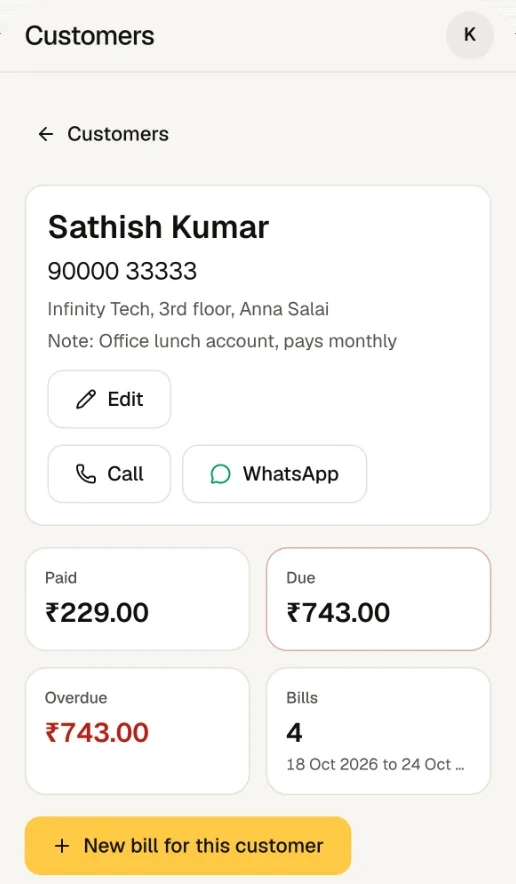
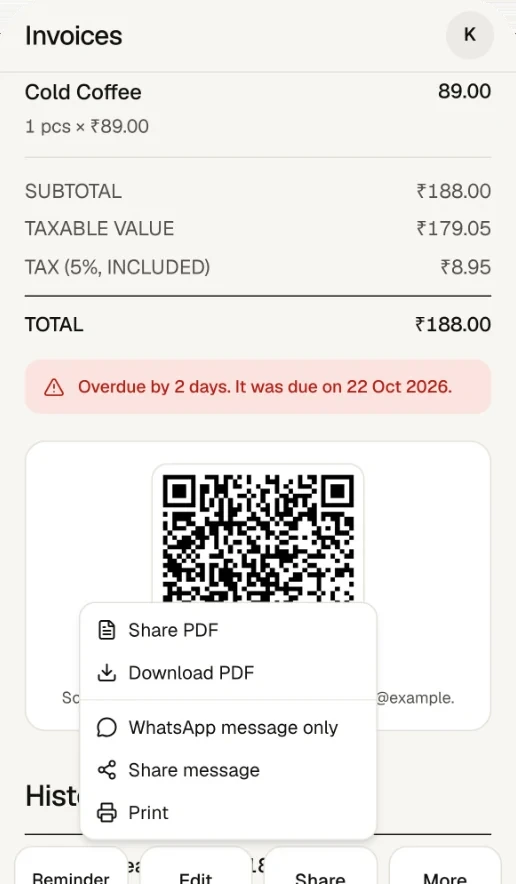
The reminder message, word for word
This is the text ProTrack prepares for a customer with two pending bills. It is short, polite and has everything needed to pay:
The UPI line appears only if you saved a UPI ID in Settings. Because WhatsApp opens with the text filled in, you can add a personal line before sending, in Tamil or any language.
Good credit habits for a small shop
| Habit | Why |
|---|---|
| Enter every credit sale at once | A bill made later is a bill forgotten |
| Set a due date (end of week or month) | Overdue flags only work with a date |
| Remind on a fixed day, for example every Monday | Regular, polite and expected beats awkward and late |
| Bill each visit separately | Small bills are easier to pay off in full |
| Set a credit limit in your head per customer | Sort by Amount due to see who has crossed it |
What you can see in reports
The Reports screen shows receivables (money owed to you) alongside sales, expenses and profit for any date range, so you know how much of this month's sales are still on credit.
Frequently asked questions
Does ProTrack send WhatsApp reminders automatically?
No. Reminders are one tap, not scheduled. ProTrack writes the message and opens WhatsApp with it filled in for that customer; you look at it and press send from your own WhatsApp. Nothing is sent without you.
What does the reminder message say?
It greets the customer by name, says it is a gentle reminder from your shop, lists each pending bill with its number, date and amount (marking overdue ones), gives the total due, adds your UPI ID if you saved one, and ends with Thank you.
Can I record a part payment against a credit bill?
Not yet. ProTrack records full payments only. If a customer pays part, keep the bill unpaid until the rest comes, or bill each visit separately so each small bill can be marked paid in full.
Why does ProTrack ask for the phone number on an unpaid bill?
So you always know who owes you. The phone number is the customer's identity: the same number links all their bills, and it is where the WhatsApp reminder goes. Paid walk-in bills can skip it.
When does a bill count as overdue?
When it has a due date and that date has passed. Overdue bills are marked in the customer list, on the invoice, and in the reminder text.
Is stock deducted when I give items on credit?
Stock is deducted when the bill is marked paid. An unpaid bill does not touch stock until then, so keep an eye on items you give on credit.
Try it on your own counter
ProTrack is free for one shop. Sign in with Google, add a few products and make your first bill today. Nothing to install from an app store.