An exact-amount (dynamic) UPI QR is a QR of a upi://pay link that carries your UPI ID and the bill amount. The customer scans it and the amount is already filled in. In ProTrack, add your UPI ID once in Settings; after that the billing screen shows a QR for the exact total when you tap Show UPI QR, and every unpaid invoice, PDF and printed receipt carries one too. Free, no payment gateway.
Static QR vs exact-amount QR
| Static QR (wall sticker) | Exact-amount QR (per bill) | |
|---|---|---|
| What it holds | Your UPI ID and name | UPI ID, name, amount and a note |
| Customer types the amount? | Yes | No, it is filled in |
| Wrong amounts | Common: ₹43 for ₹437, ₹1,000 for ₹100 | Rare: the amount is usually locked |
| Speed at a busy counter | Slow, customer asks "how much?" | Scan, PIN, done |
| Matching payments to bills | Hard | The note can carry the bill number |
| Cost | Free | Free (same UPI ID) |
Keep the wall sticker as a backup. Use the exact-amount QR for every bill you make.
What is inside the QR
The QR is just a text link in the UPI format every app understands. For a ₹437 bill it looks like this:
upi://pay?pa=masalamunch@okaxis&pn=Masala%20Munch&am=437.00&cu=INR&tn=INV%2F2026-27%2F0042
| Part | Meaning | Example |
|---|---|---|
pa | Payee address: your UPI ID | masalamunch@okaxis |
pn | Payee name shown to the customer | Masala Munch |
am | Amount in rupees, two decimals | 437.00 |
cu | Currency | INR |
tn | Transaction note, shown in both apps | INV/2026-27/0042 |
Set it up and use it at the counter
Add your UPI ID in Settings
Open Settings, enter your UPI ID (from GPay, PhonePe, Paytm or your bank app, like
name@okaxisorname@ybl) and the UPI name customers should see. Use the account where you want shop money to land.Make the bill
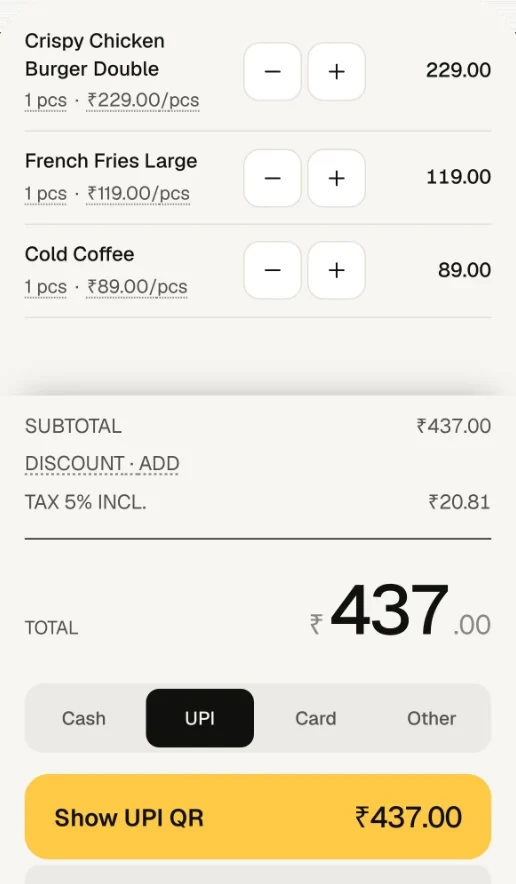
Add items on the billing screen: pieces, sizes or loose weights. Discount, GST and round-off are all included in the total.
Tap Show UPI QR
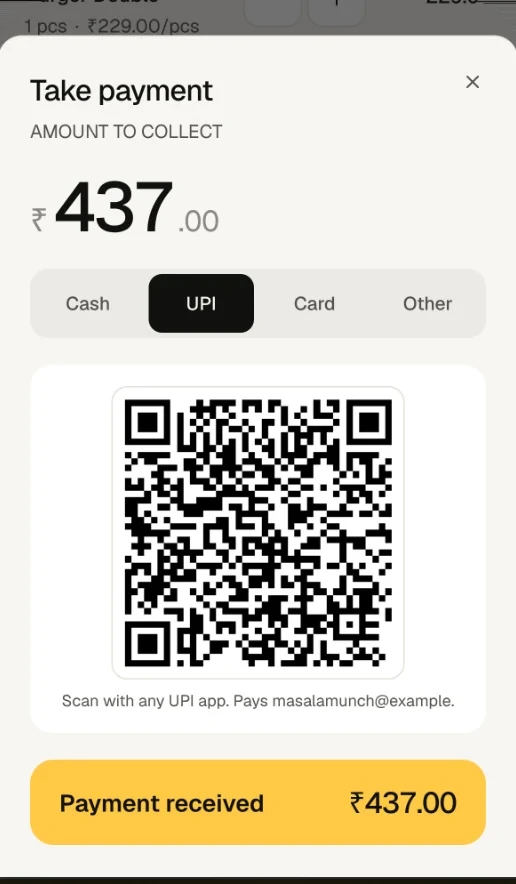
When a UPI ID is saved, UPI is the default payment method. Tap Show UPI QR: the sheet shows a QR for exactly the bill total, on a white card so it scans well even in a dark shop.
Customer scans and pays
Turn the phone towards the customer. They scan with any UPI app, see your shop name and the amount, and enter their PIN.
Check the money arrived, then tap Payment received
ProTrack is not linked to your bank, so it cannot see the payment. Wait for your soundbox, bank SMS or UPI app, then tap Payment received. The sale is saved as paid, stock comes down, and the receipt prints if Print after Charge is on.
Exact-amount QR on invoices and printed receipts
The same QR follows a bill wherever it goes, as long as it is unpaid:
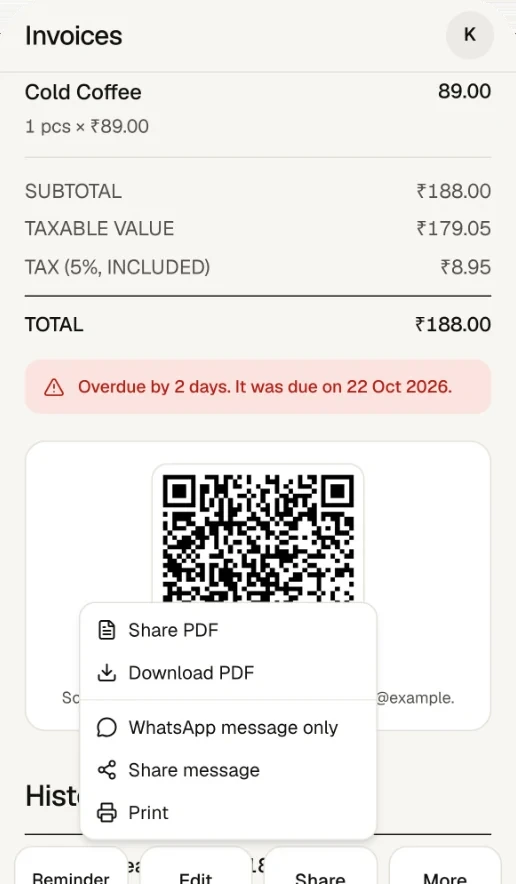
- Invoice screen and PDF: every unpaid invoice shows a QR for its total, with the invoice number as the note. Share the PDF on WhatsApp and the customer can pay from home.
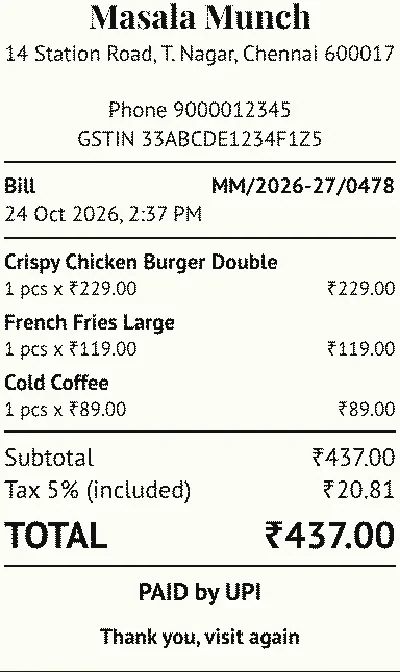
- Thermal receipt: an unpaid bill printed on a 58 mm or 80 mm printer carries the QR and "Scan to pay <your UPI ID>". A paid receipt prints PAID by UPI (or cash, card) instead.
- Credit customers: a bill saved as unpaid waits against the customer's name with its own QR. See udhaar and WhatsApp reminders.
Counter tips
- Raise screen brightness and keep the screen clean; most failed scans are glare.
- Never tap Payment received on a screenshot shown by the customer. Wait for your own soundbox or bank alert.
- Use one UPI ID for the shop so all bill payments land in one account and match your reports.
- If a printed QR will not scan, check the paper width setting matches the roll and the battery is charged.
Frequently asked questions
What is a dynamic UPI QR code?
A QR code made for one payment, with the amount (and usually a note like the bill number) built in. A static QR, like the sticker on the wall, carries only your UPI ID, so the customer has to type the amount.
Can the customer change the amount in a QR that has an amount?
Under NPCI's rules, when the amount is set and no minimum amount is given, the amount should not be editable, and most UPI apps show it locked. Behaviour can vary by app, so always check the amount that actually arrived.
Does ProTrack confirm the UPI payment automatically?
No. ProTrack makes the QR from your UPI ID but is not connected to your bank. Check the credit on your soundbox, bank SMS or UPI app, then tap Payment received.
Is there a fee for using exact-amount QR codes?
No. The QR is just your normal UPI ID with the amount added. Money goes straight to your bank account through your own UPI app, and ProTrack does not touch it or charge for it.
Where does the UPI QR appear in ProTrack?
On the billing screen's payment sheet when UPI is chosen, on every unpaid invoice and its PDF, and on the printed thermal receipt of an unpaid bill. Paid receipts say PAID instead of showing a QR.
Can I make an exact-amount UPI QR without signing up?
Yes. The free UPI QR code generator on protrack.xyz makes one from your UPI ID and an amount, in your browser, with nothing to install.
Try it on your own counter
ProTrack is free for one shop. Sign in with Google, add a few products and make your first bill today. Nothing to install from an app store.