Open app.protrack.xyz in Chrome on your Android phone, go to Settings → Receipt printer, pick 58 mm or 80 mm, choose the Bluetooth route and tap Pair printer. That is it for most printers labelled BLE or Bluetooth 4.0. If your printer does not appear in the list, it uses Classic Bluetooth: install the free RawBT app, pair it there and choose the RawBT app route. No paid app at any step.
Before you start: which Bluetooth does your printer have?
The cheap receipt printers sold on Amazon, Flipkart and IndiaMART come in two kinds, and the box rarely makes it clear. This one detail decides which route you use.
| Printer type | How to spot it | Route in ProTrack |
|---|---|---|
| Bluetooth LE (BLE) | Box or manual says BLE, Bluetooth 4.0, LE, or the maker's app "scans" for it by name | Bluetooth (straight from Chrome) |
| Classic Bluetooth (SPP) | Pairs in Android settings with a PIN like 0000 or 1234; does not show in Chrome's list | RawBT app (free, Android only) |
| USB | USB-B or micro-USB data port | USB, with a USB OTG cable on the phone |
| Dual (BT + USB) | Both ports | Either; Bluetooth is easier at a counter |
What you need
- An Android phone with Chrome (or Edge). Most phones from the last six years work.
- A 58 mm (2 inch) or 80 mm (3 inch) thermal receipt printer, charged, with a paper roll.
- A free ProTrack account (sign in with Google at app.protrack.xyz).
- Only for Classic printers: the free RawBT app from the Play Store.
Step by step
Check the printer works on its own
Load the roll with the shiny, heat-sensitive side facing the print head (if the slip comes out blank, the roll is in backwards). Hold the feed button while switching on to print the self-test page. Note the printer's name on it.
Open ProTrack in Chrome
Go to app.protrack.xyz, sign in, and tap Settings. You can also add ProTrack to the home screen from Chrome's menu so it opens like an app next time.
Choose the paper width
Under Receipt printer, pick 58 mm or 80 mm. It must match the roll, or the right edge of the bill is cut off. 58 mm prints 384 dots wide, 80 mm prints 576.
Choose the route
ProTrack only lists the routes your browser can use. On Android Chrome you will see Bluetooth, RawBT app, USB and Print dialog.
Pair the printer
5a. BLE printer: choose Bluetooth and tap Pair printer. Chrome asks for permission and shows nearby devices. Pick yours. The status line changes to Connected to <printer name>.
5b. Classic printer: install RawBT, open it, and pair your printer inside RawBT. Back in ProTrack choose the RawBT app route. ProTrack hands each bill to RawBT, which sends it to the printer.
Print a test bill
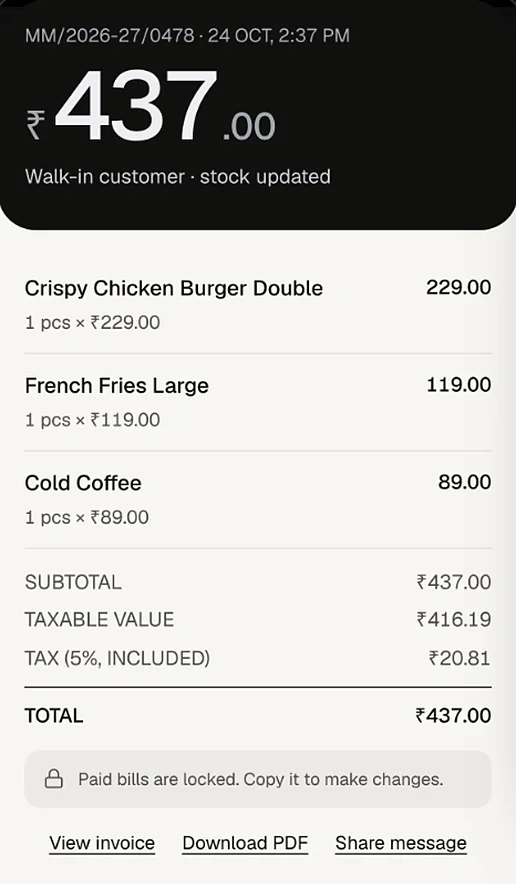
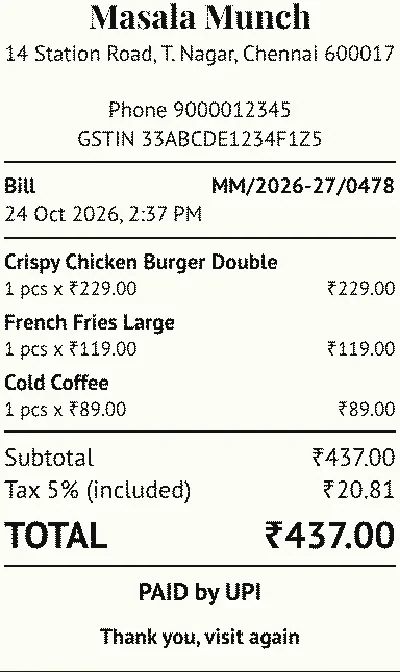
Tap Test print. The sample bill has a Tamil item name (பருப்பு வடை), the ₹ sign and a QR code. Check the Tamil letters join properly, the QR scans with your phone camera, and nothing is cut off at the right edge.
Turn on Print after Charge
Switch on Print after Charge. Now every paid sale on the billing screen prints its receipt once, without an extra tap. If your printer has an auto-cutter, also turn on Has a cutter.
Printing with a USB cable (OTG)
If Bluetooth keeps dropping at a busy counter, a cable is the most reliable link. Plug the printer into the phone with a USB OTG adapter, choose the USB route and tap Pair printer. Android needs no driver. The same route works in Chrome on a laptop or desktop; on Windows only, the printer first needs the free WinUSB driver (Zadig), which ProTrack's printer settings explain.
Fixes for common problems
The printer does not appear in the list
- It is probably Classic Bluetooth. Use RawBT (step 5b).
- Disconnect it from any other phone or app that is holding it.
- Turn on Bluetooth and Location on the phone; Android needs both for scanning.
- Tap the button yourself. Browsers refuse to open the device list automatically.
The bill stops halfway or prints random characters
Lower Bluetooth chunk size to 20, test, and raise it step by step. The default is 100 bytes; small printers have small memory.
The print is faded or blank
Charge the battery fully (weak batteries print pale), and check the roll direction. Thermal paper also fades in sunlight, so store rolls in a drawer.
A print failed in the middle of a sale
The sale is already saved. ProTrack shows a message with a Retry button, and you can reprint from the invoice's Share menu with Print receipt.
Why this works without a POS app
Chrome on Android supports Web Bluetooth and Web USB, so a web page you trust can send bytes to a printer you pick. ProTrack draws each bill as an image at the exact printer width and sends it as standard ESC/POS commands. That is why Tamil, the ₹ sign and the UPI QR print on printers whose built-in fonts have none of them. The printer setting is saved on that phone only, so a second phone or a laptop at home needs its own pairing.
Still choosing a printer? Read 58 mm vs 80 mm: which thermal printer to buy.
Frequently asked questions
Do I need a paid app to print from my phone to a Bluetooth thermal printer?
No. If the printer is Bluetooth LE, Chrome on Android can talk to it directly through ProTrack, with no app. If it is a Classic Bluetooth printer, the free RawBT app from the Play Store passes the bill to it.
Why does my printer not show up when I tap Pair printer?
Most often the printer speaks Classic Bluetooth (SPP), which no web browser can reach. Pair it inside the free RawBT app and choose the RawBT app route in ProTrack instead. Also check that the printer is on, charged, not connected to another phone, and that Location and Bluetooth are on.
Should I pair the printer in Android's Bluetooth settings first?
For a BLE printer, no: pair it from Chrome with the Pair printer button. For a Classic printer, pair it in Android settings or inside RawBT, then print through RawBT.
The bill stops printing halfway. How do I fix it?
Lower the Bluetooth chunk size in Settings, Receipt printer. It starts at 100 bytes; try 20 and raise it until prints are both fast and complete. Cheap printers have small buffers.
Can I use a USB thermal printer with my Android phone?
Yes. Connect it with a USB OTG cable, choose the USB route in Chrome and tap Pair printer. No driver is needed on Android.
Will Tamil item names and the ₹ sign print correctly?
Yes. ProTrack draws the receipt as a picture and sends it to the printer, so Tamil letters, the rupee sign and the UPI QR print correctly even though the printer's built-in font has none of them.
Does it work on iPhone?
iPhones cannot use Web Bluetooth. On iPhone, ProTrack prints through the normal print dialog with AirPrint or the printer maker's own print app.
Try it on your own counter
ProTrack is free for one shop. Sign in with Google, add a few products and make your first bill today. Nothing to install from an app store.