Sign in at app.protrack.xyz, pick a link like app.protrack.xyz/s/your-shop, add your products, then open Settings → Customize your store. Set Store language to Tamil or English, turn on Pickup and/or Delivery with a delivery note, add your opening hours, and tap Publish. Switch on Online store openand print the A5 Scan to order poster for the counter. Free for one shop, no commission, and customers pay you directly.
What your customers get
A page with your logo, banner and colour, your real price list with sizes, a cart, and a checkout that asks for name, phone, pickup or delivery, and an address for delivery. After ordering, the customer gets an order page that shows whether you have confirmed it, plus buttons to call you or send the order on WhatsApp. The order itself lands in the Orders screen of your app, not in a chat.
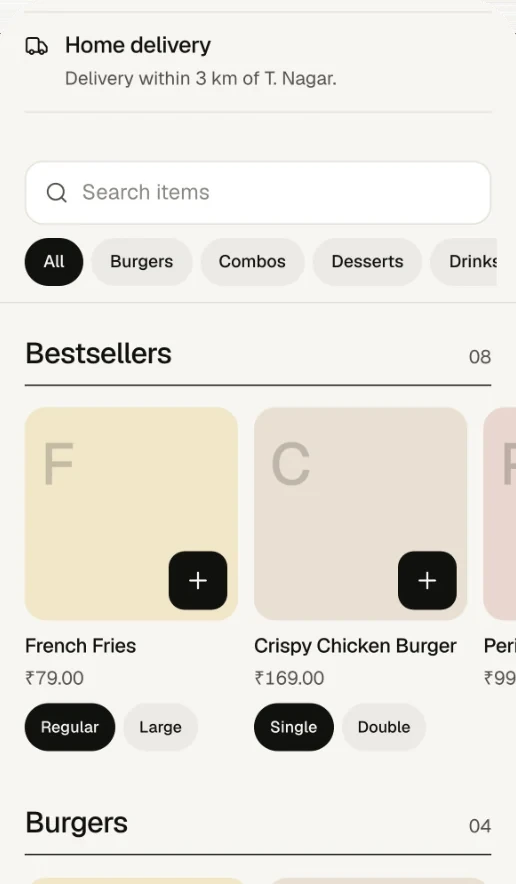
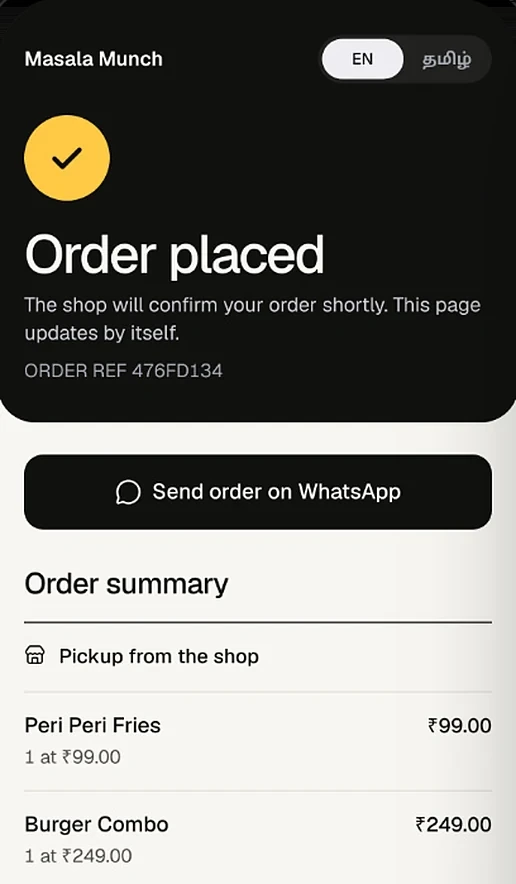
See a real one: app.protrack.xyz/s/kumarisnacks, the store of RajaGopal Sweet Stall (Kumari Snacks), a sweet and snack shop in Nagercoil.
Step by step
Sign in and pick your link
Open app.protrack.xyz, sign in with Google and fill in the business form. The link name (lowercase letters, numbers and hyphens) becomes /s/your-shop for the store and is also used for your queue link. Short and easy to say on the phone works best:
sri-murugan-bakerybeatssrimuruganbakeryandsweets2.Add the products you sell
Add each item with its price, category and a photo. Sweets and provisions usually have sizes: one product Mysore Pak with 250 g, 500 g and 1 kg variants, each with its own price and stock. Loose items can be sold by kg. Anything you do not want online, turn off Show in online store; it stays available for counter billing.
Choose the store language
In Settings → Customize your store, set Store language to Tamil for a neighbourhood that reads Tamil first. The store's buttons (cart, checkout, pickup, delivery) switch to Tamil. Product names stay as you typed them, so முறுக்கு (Murukku) works well.
Set pickup, delivery and minimum orders
Under Order rules, turn on Pickup, Delivery or both (at least one). Write a Delivery note of up to 200 characters, for example Free delivery within 3 km of Gandhipuram, 4 pm to 8 pm. Add a Minimum order for delivery (say ₹300) so a single packet does not cost you a trip.
Add opening hours and an announcement
Turn on Show opening hours and set each day (Copy Monday to all days saves time; hours cannot cross midnight, use 11:59 PM). Decide whether to Accept orders while closed. Add an Announcement of up to 120 characters with optional start and end dates.
Add logo, banner and colour, then publish
Upload a logo and banner, pick one of the brand colours, a tagline and a short about text. Pick a layout: Grid, Compact list for long provision lists, or Showcase for bakery photos. Feature up to 8 items at the top. Everything is a draft until you tap Publish; Preview shows the store as customers will see it.
Turn the store on and share it
In Settings, switch on Online store open. Then tap Share store to copy the link or Print a poster: an A5 sheet with your shop name, tagline, a large QR code and Scan to order.
Settings that matter most in Tamil Nadu
| Setting | Good starting point | Why |
|---|---|---|
| Store language | Tamil for neighbourhood shops; English if many customers are students, offices or out-of-state | Customers trust a checkout they can read |
| Delivery note | Name a landmark and radius: "within 2 km of Anna Nagar Roundtana" | Sets expectations before they order |
| Minimum order for delivery | Your break-even for one trip | Stops ₹40 delivery orders |
| Opening hours | Your real hours, with the weekly holiday marked Closed | Store shows Open now / Closed now |
| Announcement | Festival cut-off dates, rain holidays, "fresh batch at 4 pm" | Shows at the top, only between your dates |
| Featured products | Your 4 to 8 best sellers | A bestsellers row also appears automatically once you have sales |
Notes by city and shop type
Chennai: flats, offices and evening snacks
Apartment customers often order for the evening or the weekend. Turn on delivery with a tight radius and a clear time window in the delivery note, and keep pickup on for people who pass by on the way home. If you serve an IT corridor or college area, an English store may suit better; you can switch the store language any time.
Coimbatore: bakeries and repeat orders
Bakeries live on photos, so use the Showcase layout and a banner of your counter. Put cakes that need notice into the announcement ("Birthday cakes: order a day before"), and customers can add the message or flavour in the order note.
Madurai and the south: sweets, savouries and festivals
Sweet and snack shops get most of their online orders around Deepavali, Pongal and wedding season. A week or two before, add a dated announcement with the last order day, feature the gift boxes, and set a pickup minimum if you only want bulk orders that week. Customers who travel can collect on their way through town.
Where to share your link
- The counter poster. Print the A5 Scan to order poster and keep it next to the UPI sticker.
- WhatsApp. Put the link in your WhatsApp Business profile, status and broadcast lists.
- Google Business Profile. Add it as your website or order link, so people who search your shop name can order.
- Bags and bills. A small QR sticker on carry bags or boxes brings back repeat customers.
When an order comes in
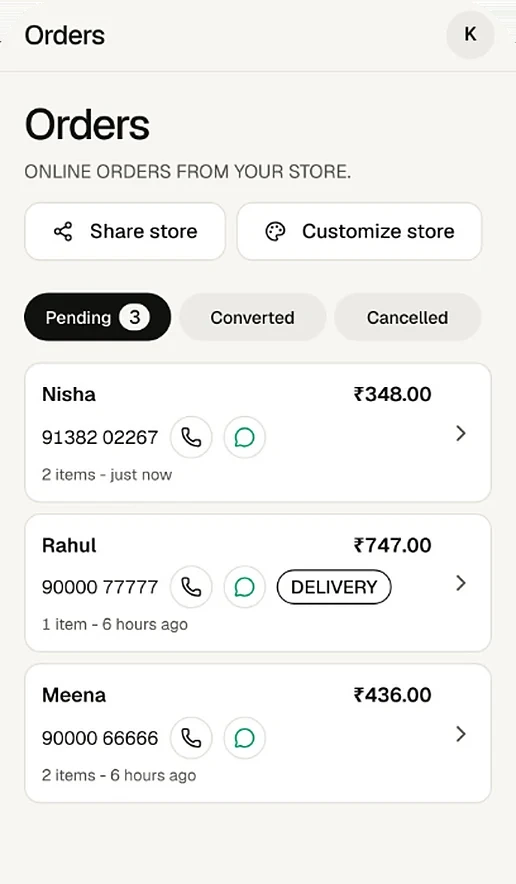
Each order shows name, phone, address (for delivery) and note. Call or WhatsApp the customer in one tap to confirm. When it is ready, tap Create invoice: ProTrack checks today's prices and stock, lets you charge the customer's prices or today's prices, and saves the bill as paid or unpaid. The customer's order page changes to confirmed. More on this in taking orders without delivery app commissions.
Frequently asked questions
Is the online store really free?
Yes. ProTrack is free for one shop, and the online store is included. There is no commission on orders, because customers pay you directly at pickup or delivery.
Can my store be in Tamil?
Yes. Set Store language to Tamil and every button and label on the store, checkout and order page appears in Tamil. Product names, the about text and announcements stay exactly as you typed them, so you can write them in Tamil, English or both.
Do customers pay online?
No. ProTrack does not collect money online. The checkout tells customers they pay the shop directly. You collect cash or UPI at pickup or delivery, and you can share a bill with a UPI QR for the exact amount.
Can I limit delivery to my area?
ProTrack does not map distances, but you can write a delivery note such as Free delivery within 3 km of the bus stand, set a minimum order for delivery, and cancel any order you cannot reach. Customers must enter an address to choose delivery.
Can I take Deepavali or Pongal pre-orders?
Yes. Add an announcement with start and end dates, for example Deepavali sweet boxes, order by 28 October, and feature the festival items at the top of the store. The announcement shows only between those dates.
What happens when the shop is closed?
If you turn on opening hours, the store shows Open now or Closed now. You choose whether to accept orders while closed, for example to collect next-morning orders, or to block them outside your hours.
Try it on your own counter
ProTrack is free for one shop. Sign in with Google, add a few products and make your first bill today. Nothing to install from an app store.