Open Queue in ProTrack, switch it open, and put the queue QR code at your entrance. Customers scan it, type their name and get a token number on their own phone that shows how many are ahead of them and, once a few people have been served, about how many minutes to wait. You tap Call next and their phone chimes and vibrates. No TV, no token machine and no app to install. Free for one shop.
Why paper tokens and shouting numbers stop working
- Customers crowd the counter because they are afraid to miss their number.
- Tokens get lost, reused or taken twice; nobody knows how long the wait really is.
- A TV display and token machine cost money, need wiring and still force people to stand where they can see the screen.
| Feature | Paper Tokens & TV Display | ProTrack Mobile Queue |
|---|---|---|
| Hardware needed | Token dispenser + TV screen & wiring | None (runs on customer's phone) |
| Waiting experience | Must stand in crowd to watch screen | Live wait on phone; can wait outside or in car |
| Turn notification | Shouting numbers or audio ding | Phone chimes and vibrates when called |
| Wait-time estimate | Unknown / rough guesswork | Auto-calculated from today's average serving time |
| Setup cost | ₹10,000 to ₹25,000+ | ₹0 (free web app) |
A phone-based queue fixes all three: each customer carries their own live display, so they can sit, step out for tea or wait in the car.
How it looks
Step by step
Sign in and open the queue
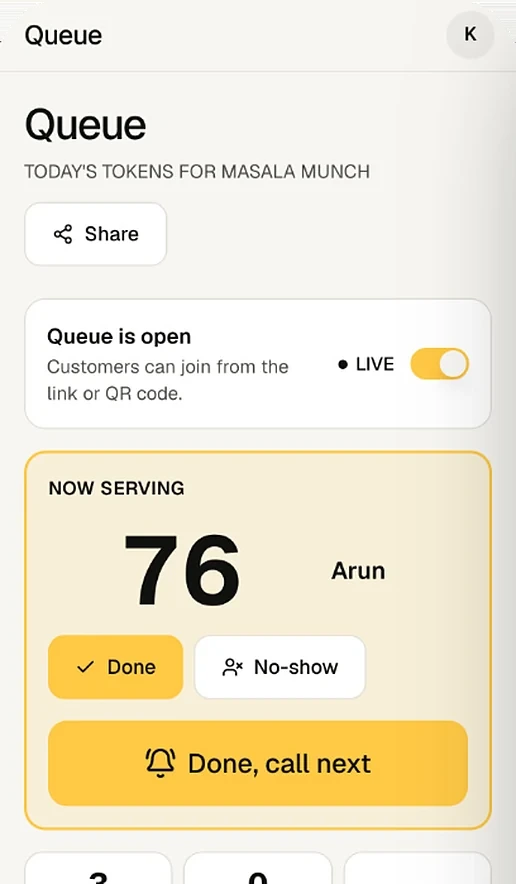
Sign in at app.protrack.xyz with Google and open Queue from the menu. Switch it to Queue is open. While it is closed, customers see that you are not taking new tokens, but you can still add walk-ins.
Put the QR at the entrance
Tap Share your queue. You get a QR code and the link app.protrack.xyz/q/your-shop, with Copy link. Print the QR and stick it at the door and the waiting area, or send the link on WhatsApp to customers who are on the way.
Customers join from their phones
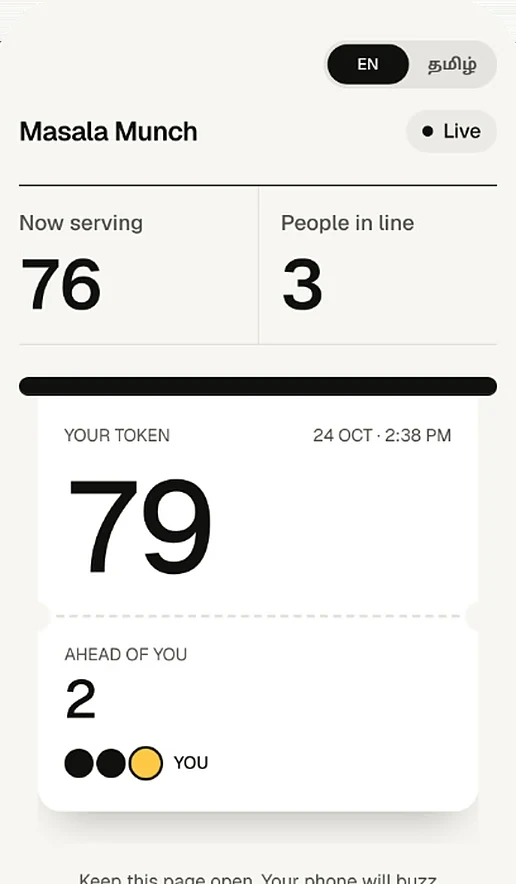
The customer taps Get a token, types their name (phone is optional, and only the shop sees it) and taps Join the queue. Their page shows the token number, how many are ahead, the token now being served, and an estimated wait. It updates live; they just keep the page open.
Add walk-ins yourself
For an elderly customer or anyone without a smartphone, tap Add walk-in: name, optional phone, optional service (haircut, billing, repair) and a VIP switch for people who should go first. With a thermal printer set up and Print a token slip turned on, a slip with their token and a QR prints at once.
Call the next customer
Tap Call next (or Done, call next). Whoever is being served is marked served, the next waiting token is called (VIP first, then by number), and that customer's phone chimes, vibrates and shows It's your turn! Please go to the counter now.
Handle no-shows and close for the day
If a called customer is not there, tap No-show; they see a message to speak to the shop or get a new token. Finished tokens can be sent Back to queue. Switch the queue closed when you stop for the day. Token numbers restart at 1 every morning.
Which shops it suits
| Shop | How to use it |
|---|---|
| Bakery or sweet shop at rush hour | QR at the door; customers browse the shelves while they wait instead of crowding the counter |
| Juice shop or chaat stall | Token per order; call by number when the order is ready |
| Clinic or diagnostic centre | Patients join on arrival and wait outside or in the car; mark elderly or emergency patients VIP |
| Salon or barber | Use the Service field (haircut, shave, facial) so you can see what each token needs |
| Repair shop, ration or service counter | Customers drop in, scan, and come back when their phone buzzes |
Built-in protection
- Privacy: customers never see other people's names or numbers, only token numbers.
- No fake joins: public joins pass a bot check, each phone can hold at most 2 active tokens a day, and customers cannot make themselves VIP.
- No duplicate numbers: one counter per shop hands out tokens, so two people never get the same number even if they scan at the same second.
- History: served counts and the average time per customer appear on the board; old tickets are cleared after 30 days.
The same account also runs your billing and your online ordering link, and the queue pages work in English and Tamil.
Frequently asked questions
Do I need a TV or a token display screen?
No. Each customer sees their own token, how many are ahead and an estimated wait on their own phone, and the owner runs the line from the queue board on a phone or tablet. ProTrack has no separate TV display mode.
Do customers need to install an app?
No. They scan the QR code or open the link in their phone's browser, type their name and get a token. Phone number is optional.
What about customers without a smartphone?
Add them from the queue board with Add walk-in. If you have a 58 mm or 80 mm thermal printer set up, ProTrack can print a token slip for them automatically.
How is the waiting time worked out?
From how long today's served customers actually took. The estimate appears after at least three customers have been served, and is then the average time multiplied by the number of people ahead.
Can customers see other people's names?
No. A customer's page shows only their own token, their position and the token now being served. Names and phone numbers are visible only to the shop.
Can a clinic use this for appointments?
It is a same-day walk-in queue, not appointment booking. Patients join when they arrive or when they are on the way, tokens are served in order (VIP first if you mark them), and numbers reset every day.
Try it on your own counter
ProTrack is free for one shop. Sign in with Google, add a few products and make your first bill today. Nothing to install from an app store.